Real PDFs without a browser. From the HTML you have, or the components you write.

A Rust/WASM engine that lays out into pages. Runs anywhere JavaScript runs. MIT licensed.

# HTML in
$ npx @formepdf/html invoice.html -o invoice.pdf
# or components in
$ npm install @formepdf/core @formepdf/react

React · Preact · Svelte · Vue · HTML/CSS

Byte-identical output across native, Node, and web builds — enforced in CI.

39/39 documents pass their claimed profiles — PDF/A-2 (2b/2u/2a), PDF/A-3 (3b/3u/3a), PDF/A-4 and A-4f, PDF/UA-1, and PDF/UA-2 — 139 veraPDF validations as a CI gate on every commit.

~53k weekly npm downloads across the package suite, led by @formepdf/core and @formepdf/react.measured 2026-09-30

Frameworks
ReactSvelteVuePreactHTML/CSS
Runtimes
Node.jsBunDenoCloudflare WorkersVercel EdgeBrowser
Languages
TypeScriptPythonGoRust

HTML input path

Bring your HTML

The print CSS browsers never finished — working. Margin boxes, page counters, @page :first, break control. One command, no browser.

letterhead.html
@page {
  margin: 72pt 54pt;
  @top-center {
    content: "ACME WIDGET CO. — CONFIDENTIAL";
  }
  @bottom-right { content: counter(page); }
}
@page :first {
  @top-center { content: none; }  /* no letterhead on the title page */
}
h2 { break-before: page; }
$ npx @formepdf/html letterhead.html -o letterhead.pdf
Title page — letterhead suppressed
Running letterhead + page counter
Every page after, automatically

A documented subset, not a silent one. Anything unsupported warns by name — skipped stylesheet links, unknown properties, unloaded @font-face families. And when the engine itself knowingly compromises — a table column clamped below its content, a split column row — that reports too, as a render defect: warning in the same stream. See the full subset table →

warning: unsupported property: text-transform-origin

Measured against 15 production templates from GitHub, graded against Chrome print: 14 render correctly, 1 degrades legibly with its cause named, 0 broken (0.20.0). How it was measured →

Python SDK

Python HTML to PDF, no system dependencies

The usual Python HTML-to-PDF route wants cairo, pango, and their headers installed. Forme doesn't. pip install formepdf[local] pulls a single dependency and renders in-process — the same engine the JavaScript packages run.

invoice.py
from jinja2 import Template
from formepdf import render_html

# The HTML you already have — a Jinja template + your data.
html = Template(INVOICE_HTML).render(invoice=invoice)

# Same Rust engine as @formepdf/html, run in-process via wasmtime.
pdf = render_html(html, page_size="A4")
open("invoice.pdf", "wb").write(pdf)
$ pip install formepdf[local]

Also on PyPI. MIT licensed, Python 3.8+.

The same engine — and a test that proves it

Not a re-implementation. The Python path runs the identical Rust engine as @formepdf/html, compiled to wasm32-wasip1. A CI job renders the same input and options through both and requires identical bytes on every commit — including the PDF/A-2b-with-embedded-fonts case. It's a regression if that ever stops being true.

No system libraries

No cairo, no pango, no system libraries, no browser. pip install formepdf[local] pulls one dependency (wasmtime) and runs in slim containers, on Lambda, and on Windows — the places a native-library toolchain makes painful.

Conformance, not just rendering

Tagged PDFs, PDF/UA accessibility, and the PDF/A archival ladder come through the same engine paths the JavaScript packages use — pass pdf_ua=True or pdfa="2b" with an embeddable font. Local certify_pdf signs with PKCS#7 / X.509.

Or write components

Prefer objects to markup? The component DSL — Document, Page, View, Text, Image, tables with headers that repeat across pages, charts, QR and barcodes, form fields — builds the same documents in pure Python.

One path from the JavaScript packages isn't on local Python yet: redact, merge, and extract. Everything above is.

Workers · Edge · Browser

The HTML path runs where your code runs

Both engine builds are WASM all the way down — verified in real headless Chromium and real workerd, not just Node. Import paths by target:

  • bundlers / browser → @formepdf/html/browser
  • Workers / edge → @formepdf/html/worker

Honest sizing: The HTML engine WASM is 7.75 MB uncompressed (3.45 MB gzipped) — since Cloudflare removed the compressed-size limit (64 MiB uncompressed on all plans, 2026-09-04), it fits the Workers free plan; real workloads need the paid plan for CPU time (free caps at 10 ms/request, a typical render is ~20 ms). Lazy-loadable in the browser. Better to know now than in a deploy error.

HTML input docs →
Cloudflare Worker — HTML in, PDF out
import { init, renderHtml } from '@formepdf/html/worker';
import wasm from '@formepdf/html/pkg-web/forme_pdf_html_bg.wasm';

export default {
  async fetch(request: Request): Promise<Response> {
    await init(wasm); // idempotent — warm isolates skip it

    const { html } = await request.json();
    const { pdf, warnings } = renderHtml(html);

    return new Response(pdf, {
      headers: { 'Content-Type': 'application/pdf' },
    });
  },
};

Write components. Get a PDF.

The same component API in React, Svelte 5, Vue 3, and Preact. Forme compiles to WASM and renders in-process: no browser, no subprocess, no waiting.

import { Document, Page, View, Text } from '@formepdf/react';
import { renderDocument } from '@formepdf/core';

const pdf = await renderDocument(
  <Document>
    <Page size="Letter" margin={36}>
      <Text style={{ fontSize: 24, fontWeight: 'bold' }}>
        Invoice #2024-001
      </Text>
      <View style={{
        flexDirection: 'row',
        justifyContent: 'space-between',
        marginTop: 24,
      }}>
        <Text>Widget Pro</Text>
        <Text>$49.00</Text>
      </View>
    </Page>
  </Document>
);

// pdf is a Uint8Array - save it, serve it, email it

Try it live

Edit the code below and watch the PDF render in real time. No sign-up, no server — everything runs in your browser.

invoice.tsx
Preview
Loading WASM engine...

The PDF problem

Every tool makes you choose

Fight with CSS page breaks in a headless browser, or use an editor that can't handle dynamic data. Puppeteer boots a full Chrome instance per render. react-pdf lays out on an infinite canvas and slices it into pages after the fact, so layout can't react to the page boundary.

Forme's approach

A layout engine built for pages

Content flows into pages, not onto an infinite canvas that gets sliced afterward. Page breaks happen at the right place every time. Flex calculations reflect actual page-constrained dimensions.

The rendering quality of a commercial CSS engine — open source, in-process, anywhere WASM runs.

~20ms
Render time (6-page report)
0
Browser dependencies
WASM
Runs in-process, no subprocess

Why Forme

See the difference in real code.

Setup

Before · Puppeteer
import puppeteer from 'puppeteer';

// Requires Chrome installed, Docker config,
// 200MB binary, sandbox flags...
const browser = await puppeteer.launch({
  args: ['--no-sandbox', '--disable-setuid-sandbox'],
  executablePath: process.env.CHROME_PATH,
});
const page = await browser.newPage();
await page.setContent(html, { waitUntil: 'networkidle0' });
const pdf = await page.pdf({ format: 'A4' });
await browser.close();
After · Forme
import { renderDocument } from '@formepdf/core';
import { Document, Page, View, Text } from '@formepdf/react';

const pdf = await renderDocument(
  <Invoice data={data} />
);

Page breaks

Before · Puppeteer
/* Guess and check. Sometimes works. */
.section { break-inside: avoid; }
.table-row { page-break-inside: avoid; }
/* Nested flex + page breaks = good luck */

@media print {
  .header { position: fixed; top: 0; }
  /* Hope the browser repeats it... */
}
After · Forme
<Table>
  <Row header>
    <Cell>Item</Cell>
    <Cell>Price</Cell>
  </Row>
  {items.map(item => (
    <Row key={item.id}>
      <Cell>{item.name}</Cell>
      <Cell>{item.price}</Cell>
    </Row>
  ))}
  {/* Page breaks handled automatically */}
  {/* Table headers repeat on every page */}
</Table>

Deployment

Before · Puppeteer
FROM node:20

# Install Chrome dependencies (500MB+)
RUN apt-get update && apt-get install -y \
  chromium fonts-liberation \
  --no-install-recommends

ENV PUPPETEER_EXECUTABLE_PATH=/usr/bin/chromium
# Memory limits, cold starts, Lambda layers...
After · Forme
npm install @formepdf/core @formepdf/react

# That's it.
# WASM runs anywhere:
# - Cloudflare Workers
# - Vercel Edge
# - AWS Lambda
# - Browser
# Zero native dependencies.

Everything you need

A complete PDF engine, from layout primitives to dev tooling. Everything here ships in the npm packages.

Layout & typography

Page-native layout

Content flows into pages, not onto an infinite canvas that gets sliced. Page breaks land in the right place, and no paragraph ever leaves a widow or orphan line at a boundary.

Tables that page correctly

Header rows repeat on every page automatically. Cell content is preserved across page breaks, never silently dropped.

Hyphenation & line breaking

Knuth-Plass optimal line breaking from TeX, with automatic hyphenation in 35+ languages.

OpenType shaping

Real GSUB/GPOS shaping for ligatures, kerning, and contextual forms. TrueType embedding with automatic subsetting — only used glyphs ship.

BiDi text

Right-to-left text for Arabic and Hebrew in the component API. Mixed LTR/RTL with automatic direction detection. The HTML path honours dir="rtl" and CSS direction.

CSS Grid

2D grid layout with fixed, fractional, and auto track sizing. Explicit and auto placement. Component API and display: grid in the HTML path — a documented subset, warned by name outside it.

Getting content in

Bring your HTML

Render existing HTML + print CSS through @formepdf/html: @page rules, margin boxes, page counters, break control. A documented subset — anything unsupported warns by name.

React, Svelte, Vue & Preact

Document, Page, View, Text, Image, Table. Author documents as components in the framework you already use.

Live preview & inspect

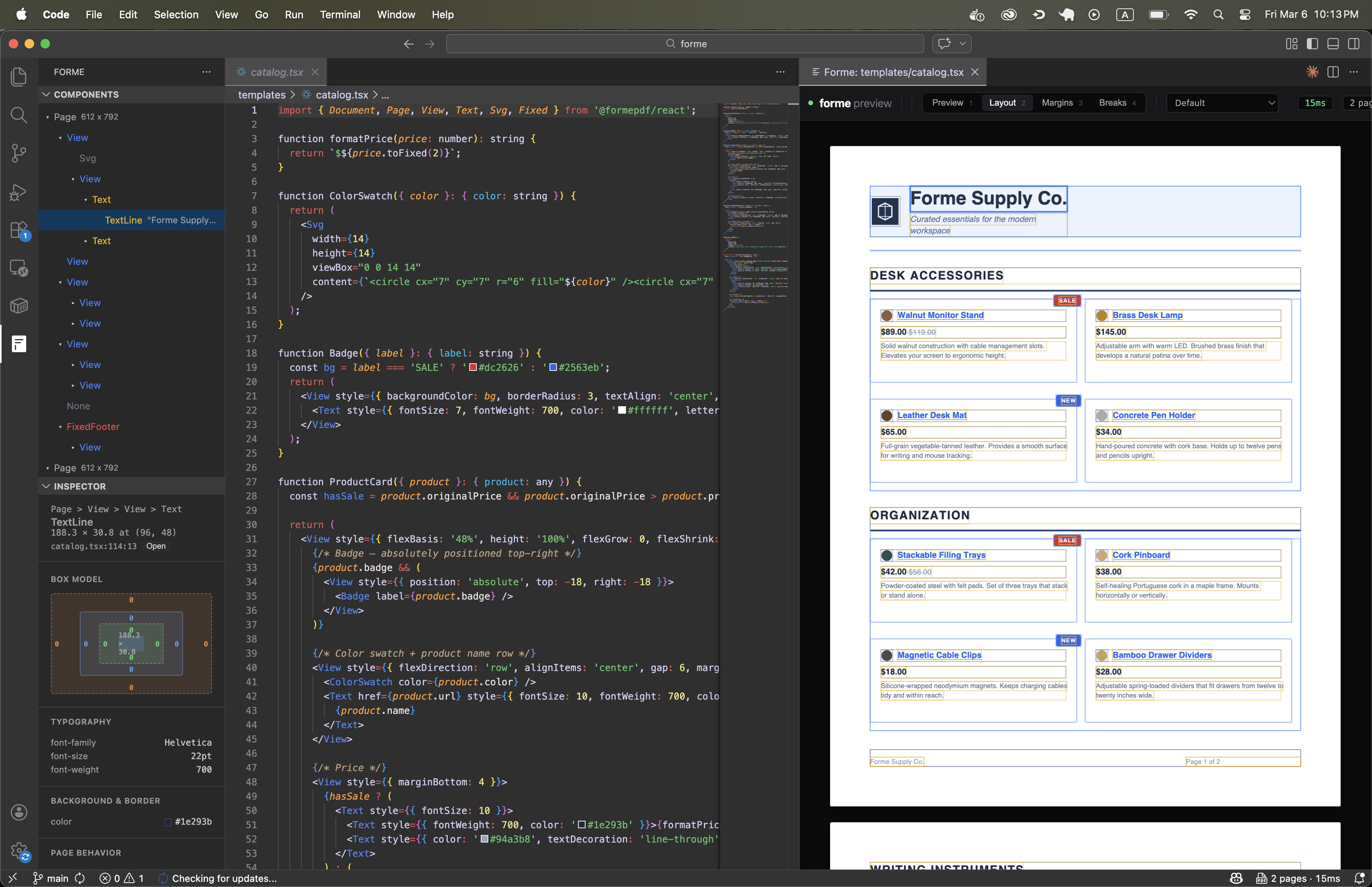
forme dev shows your PDF updating as you edit. Click any element to see its box model and computed styles — in the browser or the VS Code extension.

Document features

PDF/UA-1 and UA-2 accessibility

Structure trees, marked content, alt text, and tab order — built into the engine. Both generations verified end-to-end by veraPDF in CI; pdfUa2 emits the PDF 2.0 structure namespace.

PDF/A-2 through A-4f archival

The full ladder — 2b/2u/2a, 3b/3u/3a, 4, 4f — verified with veraPDF. Composes with PDF/UA at both generations. Refuses to emit non-conformant output.

Digital certification

Certify documents at render time with X.509/RSA certificates, or certify existing PDFs with certifyPdf(). PKCS#7, pure Rust — no external signing service.

Redaction & merging

redactText() removes content-stream text by literal or regex match — true removal, not a black box over selectable text. mergePdfs() combines documents.

Interactive PDF forms

Fillable text fields, checkboxes, dropdowns, and radio buttons. Full AcroForm support, with optional flattening to static content.

Embedded data

Attach structured JSON to any PDF and extract it back programmatically — no OCR needed. Works client-side too, with @formepdf/core/browser.

Graphics

Charts, engine-native

BarChart, LineChart, PieChart, AreaChart, DotPlot — rendered as vectors by the engine itself. No SVG hand-rolling, no chart library in your bundle.

QR codes & barcodes

Built-in <QrCode> and <Barcode> components. Code 128, Code 39, EAN-13, EAN-8, Codabar. Vector-based, crisp at any zoom.

Accessibility & archival

PDF/UA-1 and UA-2, PDF/A-2 through A-4f — verified, not aspirational

Tagged PDF structure is on by default: structure trees, marked content, alt text, and keyboard tab order come out of every render. Strict pdfUa mode is one prop away — or pdfUa2 for the PDF 2.0 successor standard — with embedding via @formepdf/fonts-standard — metric-compatible fonts, so the accessible document lays out exactly like the one you previewed.

Scope claimed is scope verified: PDF/A-2 (2b/2u/2a), PDF/A-3 (3b/3u/3a), PDF/A-4 and A-4f, PDF/UA-1, and PDF/UA-2, every level verified with veraPDF. Archival composes with accessibility at both generations — PDF/A-2a + PDF/UA-1 on PDF 1.7, PDF/A-4 + PDF/UA-2 on PDF 2.0 — so one document can be both.

PDF/A needs embeddable fonts — install @formepdf/fonts-standard or register your own. If a font can't be embedded, pdfA refuses to render rather than emitting a file whose metadata claims conformance it doesn't have. The refusal is the feature.

Accessibility docs →
39/39

documents pass their claimed profiles — the 9-file conformance corpus plus the 30 gallery templates

veraPDF

validates the full corpus as a CI gate on every commit — not a one-time audit

0pt

layout drift: accessible output is geometry-identical to normal output

A-2→A-4f

the full archival ladder — 2b/2u/2a, 3b/3u/3a, 4, and 4f — CI renders the corpus as PDF/A + PDF/UA together and validates both profiles at every gated level

A + UA

the archival-and-accessible combination is the configuration government, education, and healthcare buyers actually need — one document, both standards

Thirty templates to start from

A complete document system — invoices, contracts, reports, labels — built as one family. Copy the HTML and CSS, plug in your data, render. Every one passes PDF/UA-1 validation in CI.

VS Code Extension

Live preview without leaving your editor

Component tree, inspector, and PDF preview in a native VS Code panel. Click any element to jump to its source line.

Install from Marketplace
Forme PDF Preview in VS Code

How Forme compares

Side-by-side with the tools you're probably evaluating.

Formereact-pdfPuppeteer
Bring existing HTML/CSSYes (@formepdf/html)No (JSX only)Yes
Runs without a browserYes (WASM, in-process)YesNo (headless Chrome)
Print CSS: @page, margin boxes, countersYes, incl. @page :firstNoPartial (no margin boxes)
Page breaksPage-native layout (widows/orphans)Widows/orphans (recent rewrite)CSS page-break (fragile)
Table headersAutomatic on every pageNot built inInconsistent <thead>
Line breakingKnuth-PlassKnuth-PlassBrowser engine
HyphenationAutomatic, 35+ languages bundledAutomatic (en-US bundled)Browser engine
Text shapingOpenType GSUB/GPOS (rustybuzz)OpenType GSUB/GPOS (fontkit)Full browser shaping
BiDi textRTL, mixed LTR/RTL (unicode-bidi)RTL, mixed LTR/RTL (bidi-js)Full browser BiDi
CSS GridComponent API: display 'grid', fr/auto/fixed tracksNoFull CSS Grid
Live previewBuilt-in dev serverRender to fileRun script, open file
Click-to-inspectVS Code, Cursor, WebStormNoNo
Editor extensionVS Code sidebar panelsNoNo
Render speed~20ms (6-page report)~100-500ms~1-5s (Chrome boot)
MemoryNo browser process (WASM)~50-100MB~50-200MB
Linkshref prop on Text/View<Link> componentHTML <a> tags
Bookmarksbookmark prop on any elementYesNo
Charts5 built-in components, engine-native vectorsNo (hand-rolled SVG)Via JS chart libraries
QR codesBuilt-in <QrCode> componentNoVia HTML/JS libraries
BarcodesBuilt-in <Barcode> (5 formats)NoVia HTML/JS libraries
Text overflowtextOverflow: 'ellipsis'textOverflow + maxLinesCSS text-overflow
Font fallbackfontFamily array + per-glyph fallbackfontFamily arrayFull CSS font stack
Custom fontsTTF with OpenType shapingYesYes
Embedded dataAttach JSON, extract laterNoNo
Browser renderingYes (same WASM engine)Yes (client-side)No (server only)
DependenciesNone (WASM)yoga-layoutChrome/Chromium
Runs in-processYesYesNo (subprocess)
PDF/A archival conformancePDF/A-2, A-3, A-4/A-4f — veraPDF-verified, composes with PDF/UA-1 and UA-2NoNo (Chrome print output isn't PDF/A)
True redactionredactText() — literal/regex, content-stream removalNoNo
PDF mergingmergePdfs() in @formepdf/coreNoNo
Digital certificationcertifyPdf() — PKCS#7/RSA, pure RustNoNo

Render speed, cold start, and memory are measured per document and per runtime on a fixed corpus — including where Forme loses to a warm Puppeteer on very large tables. See the benchmarks →

Testing generated PDFs — from Forme or any of these producers? pdf-testkit diffs their structure on every commit. See pdf-testkit →

Common questions

Can you generate a PDF from HTML without a headless browser?
Yes. Forme is a layout engine written in Rust and compiled to WASM, so it lays HTML and print CSS out into pages in-process. There is no Chromium to install, no subprocess to supervise, and no browser binary in your image.
Can I generate PDFs from Python without system dependencies?
Yes. pip install formepdf[local] renders HTML and print CSS to PDF in-process through the engine compiled to wasm32-wasip1 and run via wasmtime — no cairo, no pango, no system libraries, no browser. It pulls a single dependency. It is the same Rust engine as the JavaScript packages: a CI job renders the same input through both and requires byte-identical output on every commit, including PDF/A with embedded fonts. PDF/UA and PDF/A conformance and local PKCS#7 signing are included, and there is a component DSL as well as the HTML path. Redact, merge, and extract are bound in the JavaScript packages but not yet on the local Python path.
Is Forme a drop-in Puppeteer alternative?
For document rendering, largely yes — you pass HTML and get bytes back, and there is a migration guide. What differs is scope: Puppeteer automates a whole browser, so if you depend on running JavaScript in the page, screenshotting live sites, or scraping, Forme does not replace that. It replaces the PDF half, without the Chrome half.
Does Forme support @page rules, margin boxes, and page counters?
Yes, including @page :first, running headers via @top-center, counter(page), and break-before. It is a documented subset rather than all of CSS — anything outside it warns by name at render time instead of failing silently.
Can I generate PDFs on Cloudflare Workers or Vercel Edge?
Yes. Both engine builds are WASM, verified in real workerd rather than only in Node. Import @formepdf/html/worker on the edge and @formepdf/html/browser in bundlers. The HTML engine WASM is 7.75 MB uncompressed (3.45 MB gzipped, measured at 0.20.0). Since Cloudflare removed the size limit (64 MiB uncompressed on all plans, 2026-09-04) it fits the Workers free plan; real workloads need the paid plan for CPU time — free caps at 10 ms per request and a typical render is ~20 ms. It can be lazy-loaded in the browser.
How does Forme compare to react-pdf?
The component API will feel familiar, and both do Knuth-Plass line breaking and OpenType shaping. Forme adds an HTML input path, CSS Grid in the component API, table headers that repeat across pages, verified PDF/UA-1 and PDF/UA-2 output, certification, and true redaction. react-pdf is JSX-only.
Is Forme really open source, and can I self-host it?
Yes — MIT licensed, engine included, no open-core split and no paid tier gating features. Install from npm or build from source; nothing calls home and there is no hosted service in the render path.
Is the accessibility support real, or aspirational?
Verified. Thirty-nine documents — the 9-file conformance corpus plus the 30 gallery templates — pass their claimed profiles, validated by veraPDF as a CI gate on every commit: PDF/UA-1, and PDF/UA-2 (the PDF 2.0 successor) composed with PDF/A-4. Accessible output is geometry-identical to normal output, and archival composes with accessibility at both generations.
Does Forme produce PDF/A files?
Yes — the full ladder: PDF/A-2 (2b/2u/2a), PDF/A-3 (3b/3u/3a), and PDF/A-4 and A-4f over PDF 2.0, every level verified with veraPDF in CI. Archival composes with accessibility at both generations (A-2a + UA-1, A-4 + UA-2). Embedding requires @formepdf/fonts-standard (or your own registered fonts): if a font can't be embedded, pdfa refuses to render rather than emitting a file whose metadata claims conformance it doesn't have.

Using Forme in production?

I'd love to hear what you're generating, what you migrated from, and roughly how many documents you produce. It directly shapes what gets built next.

Start building PDFs in 60 seconds

$ npx @formepdf/html invoice.html -o invoice.pdf
$ npx @formepdf/cli dev invoice.tsx

Recently shipped

  • 0.22PDF 2.0 output, PDF/A-4 and A-4f, and PDF/UA-2 — the full conformance ladder, veraPDF-gated; font-metric baselines put text ink where browsers put it.
  • 0.21The thirty-template library and its generated gallery; @formepdf/preview for in-app preview rendering.
  • 0.20CSS floats, attribute selectors, and CSS tables on the HTML path; browser-exact half-leading.
  • 0.16PDF/A-2 conformance, veraPDF-verified, composing with PDF/UA-1 — one document, archival and accessible.

All releases