Open source PDF engine

PDF generation
with JSX.

Page breaks that actually work. No headless browser. No Chrome. Renders in milliseconds — in Node or the browser. Enterprise-ready with PDF/UA accessibility, PDF/A archival, and digital signatures.

$ npm install @formepdf/cli @formepdf/react @formepdf/core
$ npx @formepdf/cli dev your-template.tsx

Write JSX. Get a PDF.

Build documents with familiar React components. Forme compiles to WASM and renders in-process - no browser, no subprocess, no waiting.

import { Document, Page, View, Text } from '@formepdf/react';
import { renderDocument } from '@formepdf/core';

const pdf = await renderDocument(
  <Document>
    <Page size="Letter" margin={36}>
      <Text style={{ fontSize: 24, fontWeight: 'bold' }}>
        Invoice #2024-001
      </Text>
      <View style={{
        flexDirection: 'row',
        justifyContent: 'space-between',
        marginTop: 24,
      }}>
        <Text>Widget Pro</Text>
        <Text>$49.00</Text>
      </View>
    </Page>
  </Document>
);

// pdf is a Uint8Array - save it, serve it, email it

The PDF problem

Every tool makes you choose

Fight with CSS page breaks in a headless browser, or use an editor that can't handle dynamic data. Puppeteer boots a full Chrome instance per render. react-pdf's flex layout has been broken on page boundaries for 7 years.

Forme's approach

A layout engine built for pages

Content flows into pages, not onto an infinite canvas that gets sliced afterward. Page breaks happen at the right place every time. Flex calculations reflect actual page-constrained dimensions.

~0ms
Render time (4-page report)
0
Browser dependencies
WASM
Runs in-process, no subprocess

Try it live

Edit the JSX below and watch the PDF render in real time. No sign-up, no server — everything runs in your browser.

invoice.tsx
Preview
Loading WASM engine...

Why Forme

See the difference in real code.

Setup

Before · Puppeteer
import puppeteer from 'puppeteer';

// Requires Chrome installed, Docker config,
// 200MB binary, sandbox flags...
const browser = await puppeteer.launch({
  args: ['--no-sandbox', '--disable-setuid-sandbox'],
  executablePath: process.env.CHROME_PATH,
});
const page = await browser.newPage();
await page.setContent(html, { waitUntil: 'networkidle0' });
const pdf = await page.pdf({ format: 'A4' });
await browser.close();
After · Forme
import { renderDocument } from '@formepdf/core';
import { Document, Page, View, Text } from '@formepdf/react';

const pdf = await renderDocument(
  <Invoice data={data} />
);

Page breaks

Before · Puppeteer
/* Guess and check. Sometimes works. */
.section { break-inside: avoid; }
.table-row { page-break-inside: avoid; }
/* Nested flex + page breaks = good luck */

@media print {
  .header { position: fixed; top: 0; }
  /* Hope the browser repeats it... */
}
After · Forme
<Table>
  <Row header>
    <Cell>Item</Cell>
    <Cell>Price</Cell>
  </Row>
  {items.map(item => (
    <Row key={item.id}>
      <Cell>{item.name}</Cell>
      <Cell>{item.price}</Cell>
    </Row>
  ))}
  {/* Page breaks handled automatically */}
  {/* Table headers repeat on every page */}
</Table>

Deployment

Before · Puppeteer
FROM node:20

# Install Chrome dependencies (500MB+)
RUN apt-get update && apt-get install -y \
  chromium fonts-liberation \
  --no-install-recommends

ENV PUPPETEER_EXECUTABLE_PATH=/usr/bin/chromium
# Memory limits, cold starts, Lambda layers...
After · Forme
npm install @formepdf/core @formepdf/react

# That's it.
# WASM runs anywhere:
# - Cloudflare Workers
# - Vercel Edge
# - AWS Lambda
# - Browser
# Zero native dependencies.

AI-Powered

Generate templates with AI

Describe your document or upload a reference — invoice, report, certificate, anything. Forme generates a ready-to-edit JSX template in seconds.

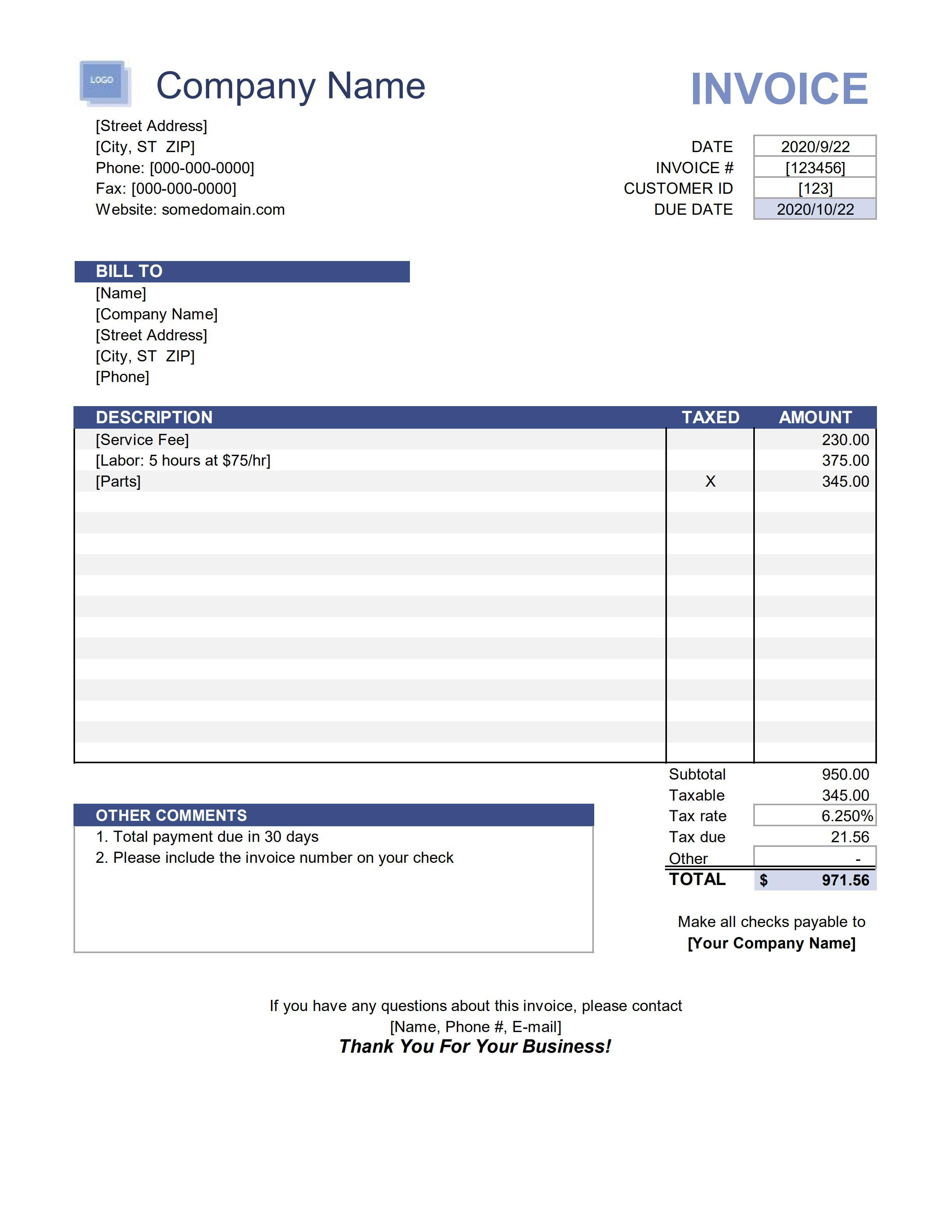
Upload a reference
Reference invoice uploaded to Forme
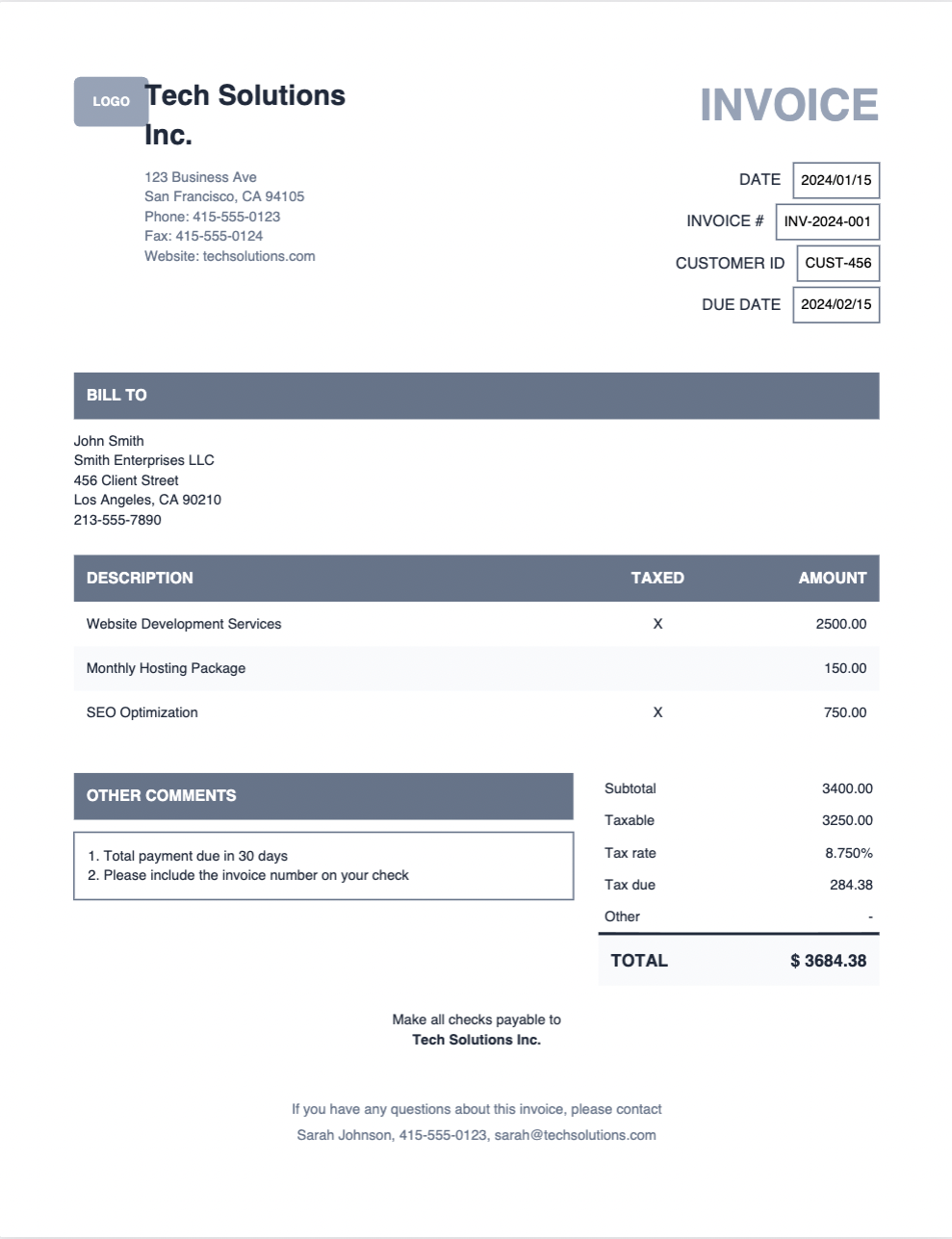
Get a template back
AI-generated Forme template from the reference
Text descriptions
PDF upload
Image upload
Auto sample data

Everything you need

A complete PDF toolkit, from layout primitives to dev tooling.

Page-native layout

Content flows into pages. Page breaks happen at the right place, every time.

React components

Document, Page, View, Text, Image, Table. If you know React, you know Forme.

Live preview

forme dev shows your PDF updating in real time as you edit.

Click-to-inspect

Select any element to see its box model, computed styles, and position.

VS Code extension

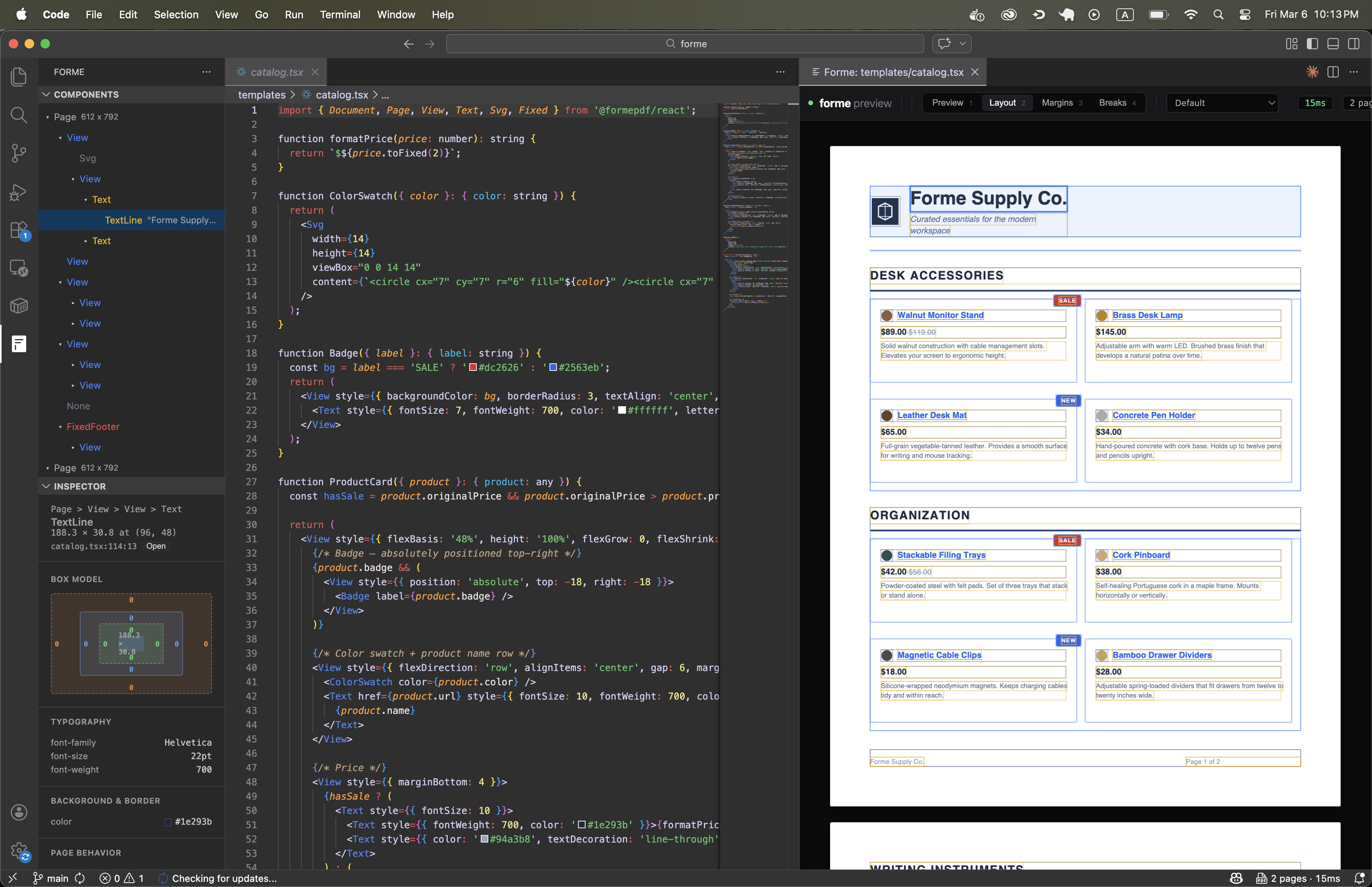
Live PDF preview, component tree, and inspector panel inside your editor.

Rust + WASM

Renders in milliseconds, not seconds. No browser process needed.

OpenType shaping

Real GSUB/GPOS shaping for ligatures, kerning, and contextual forms with custom fonts.

Hyphenation

Automatic hyphenation in 35+ languages. Knuth-Plass optimal line breaking from TeX.

BiDi text

Right-to-left text for Arabic and Hebrew. Mixed LTR/RTL with automatic direction detection.

CSS Grid

2D grid layout with fixed, fractional, and auto track sizing. Explicit and auto placement.

Flex wrap

Flex containers wrap across pages correctly with full align-content support.

Widow/orphan control

Text never leaves a single orphan or widow line at a page boundary.

Table overflow

Tables with automatic header repetition. Cell content preserved across page breaks.

Custom fonts

TrueType font embedding with automatic subsetting. Only used glyphs are included.

QR codes & barcodes

Built-in <QrCode> and <Barcode> components. Code 128, Code 39, EAN-13, EAN-8, Codabar. Vector-based, crisp at any zoom.

Text overflow

Single-line truncation with ellipsis or clip. Ideal for grid cells and compact layouts.

SVG support

Inline SVG with rect, circle, ellipse, line, polyline, polygon, and path.

Links + bookmarks

Clickable PDF links on any element. Bookmarks for document outline navigation.

Dynamic page numbers

Use {{pageNumber}} and {{totalPages}} in any text element.

Embedded data

Attach structured JSON to any PDF. Extract the original data programmatically - no OCR needed.

Browser rendering

Generate PDFs client-side with @formepdf/core/browser. Same engine, same templates - no server required.

Tailwind CSS

Style with tw("p-4 text-lg font-bold bg-blue-500"). Full color palette, grid, arbitrary values, fractions.

AI template generation

Describe a document or upload a reference image. AI generates a production-ready Forme template with sample data.

Interactive PDF forms

Embed fillable text fields, checkboxes, dropdowns, and radio buttons directly in generated PDFs. Full AcroForm support -- no JavaScript required.

Accessibility compliant

Generate tagged PDFs that pass PDF/UA-1 validation. Structure trees, marked content, alt text, and keyboard tab order -- built into the engine.

PDF/A archival

Produce ISO-compliant archival PDFs (PDF/A-2a, 2b) with embedded fonts, XMP metadata, and sRGB color profiles. Drop-in compliance for regulated industries.

Digital signatures

Sign PDFs with X.509 certificates and RSA keys using PKCS#7 detached signatures -- pure Rust, no external signing service. Visible or invisible signature fields.
Production-ready templates

Start from a professional template and customize it with AI. No design skills required.

Hosted API

Don't want to host it yourself?

Send one POST request with your template and data. Get a PDF back in milliseconds. No infrastructure to manage.

curl -X POST https://api.formepdf.com/render \
  -H "Authorization: Bearer fm_your_api_key" \
  -H "Content-Type: application/json" \
  -d '{"template": "invoice", "data": {"amount": 49}}' \
  -o invoice.pdf

Build templates in your browser

Use the playground to design and preview templates with live data - no local setup required.

AI template generation

Describe what you need or upload a reference PDF. AI builds the template and sample data for you.

Call from any language

One POST request with JSON in, PDF out. Works with any language or framework that can make HTTP calls.

VS Code Extension

Live preview without leaving your editor

Component tree, inspector, and PDF preview in a native VS Code panel. Click any element to jump to its source line.

Install from Marketplace
Forme PDF Preview in VS Code

How Forme compares

Side-by-side with the tools you're probably evaluating.

Formereact-pdfPuppeteer
Page breaksPage-native (widow/orphan aware)Broken for 7 yearsCSS page-break (fragile)
Table headersAutomatic on every pageNot built inInconsistent <thead>
Line breakingKnuth-Plass optimal (TeX algorithm)GreedyBrowser engine
Hyphenation35+ languages, automaticVia callbackBrowser engine
Text shapingOpenType GSUB/GPOS (ligatures, kerning)BasicFull browser shaping
BiDi textRTL, mixed LTR/RTL, auto-detectionNoFull browser BiDi
CSS Griddisplay: 'grid' with fr/auto/fixed tracksNoFull CSS Grid
Live previewBuilt-in dev serverRender to fileRun script, open file
Click-to-inspectVS Code, Cursor, WebStormNoNo
Editor extensionVS Code sidebar panelsNoNo
Render speed~28ms (4-page report)~100-500ms~1-5s (Chrome boot)
MemoryNo browser process (WASM)~50-100MB~50-200MB
Linkshref prop on Text/View<Link> componentHTML <a> tags
Bookmarksbookmark prop on any elementYesNo
QR codesBuilt-in <QrCode> componentNoVia HTML/JS libraries
BarcodesBuilt-in <Barcode> (5 formats)NoVia HTML/JS libraries
Text overflowtextOverflow: 'ellipsis'NoCSS text-overflow
Font fallbackfontFamily: 'Inter, Helvetica'Single family onlyFull CSS font stack
Custom fontsTTF with OpenType shapingYesYes
Embedded dataAttach JSON, extract laterNoNo
Browser renderingYes (same WASM engine)Yes (client-side)No (server only)
DependenciesNone (WASM)yoga-layoutChrome/Chromium
Runs in-processYesYesNo (subprocess)

Open Source

Start with the library

$ npm install @formepdf/cli @formepdf/react @formepdf/core
$ npx @formepdf/cli dev invoice.tsx

Hosted API

Or skip the setup

Create an account and start rendering PDFs with a single API call. No packages to install, no infrastructure to manage.